 Your Success, Our Priority: Our team is here to assist you!

What Is SMTP Warm-Up?
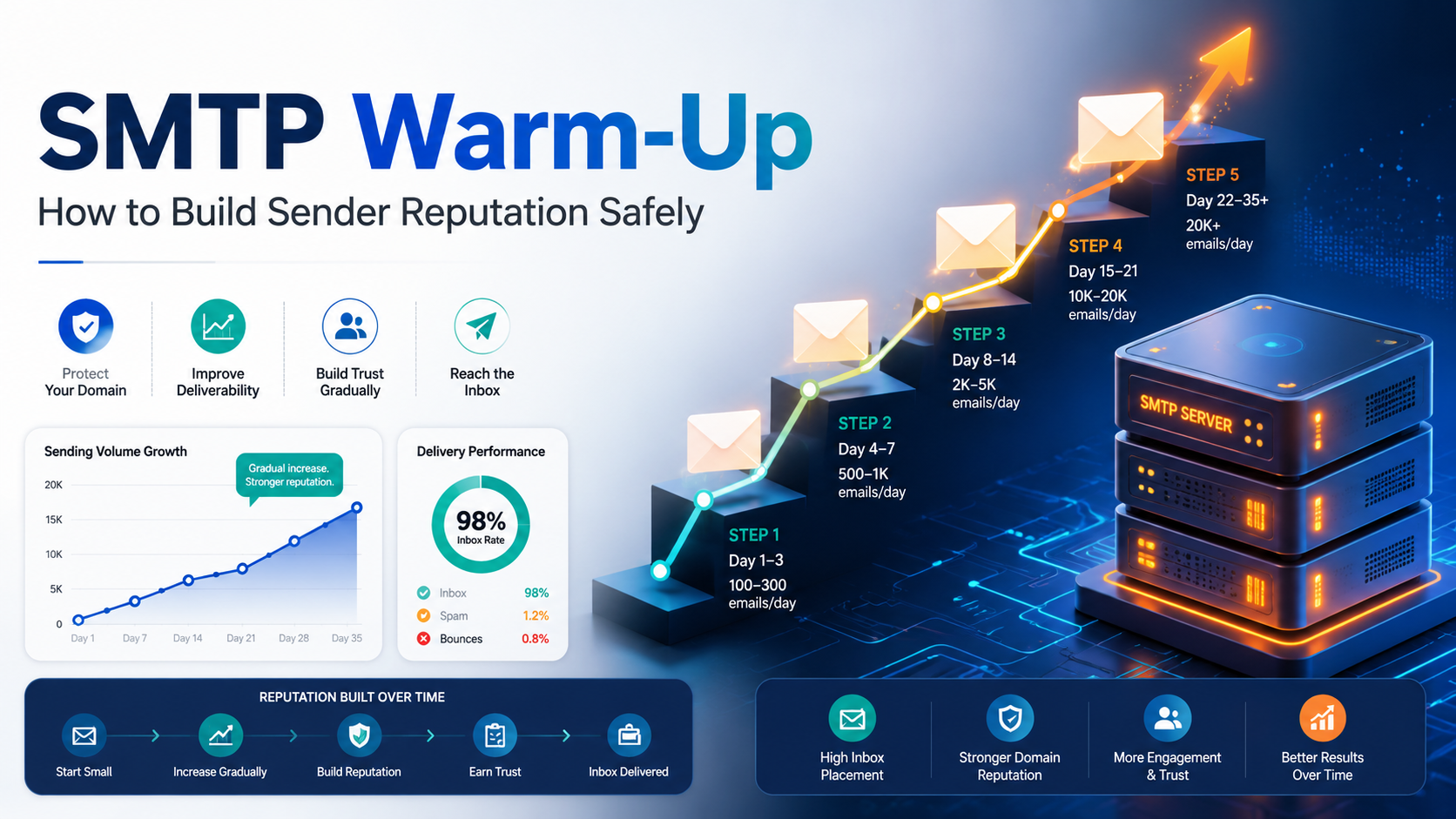
SMTP warm-up is the process of slowly increasing email volume from a new SMTP server so mailbox providers can evaluate your sending behavior. Since a new server or IP address has little or no sending history, inbox providers do not immediately know whether your emails are wanted, safe, or spam-like.
During the warm-up period, mailbox providers watch signals such as:
- Email authentication status
- Bounce rate
- Spam complaint rate
- User engagement
- Sending consistency
- Unsubscribe behavior
- Blacklist or blocklist activity
A good warm-up helps your SMTP server build a positive reputation step by step. A rushed warm-up can cause throttling, spam placement, temporary blocks, or long-term sender reputation damage.
Why Warming Up a New SMTP Server Matters
Mailbox providers protect their users from spam, phishing, malware, and unwanted email. When they see a new SMTP server suddenly sending high volume, it can look suspicious.
For example, a new server sending 50,000 emails on the first day may trigger filtering systems because there is no trusted history behind that traffic. But if the same server sends a small number of relevant emails first, gets low complaints, receives positive engagement, and increases gradually, providers have more reason to trust future mail.
SMTP warm-up is especially important when:
- You are using a new SMTP server
- You are moving from one email provider to another
- You are starting with a new sending domain or subdomain
- You are using a new dedicated IP
- You are increasing daily email volume significantly
- You are launching a new bulk email campaign system
Before You Start SMTP Warm-Up: Technical Checklist
Do not begin warm-up until your sending infrastructure is properly configured. If authentication or DNS is wrong, even a slow warm-up may fail.
1. Set Up SPF
SPF tells receiving servers which mail servers are allowed to send email for your domain. Make sure your SMTP provider or sending IP is included in your SPF record.
2. Set Up DKIM
DKIM adds a digital signature to your emails. It helps mailbox providers verify that the message was authorized and not modified during delivery.
3. Publish a DMARC Record
DMARC connects SPF and DKIM with your visible From domain. For a new setup, many senders start with a monitoring policy such as p=none, then move toward stricter policies after confirming all legitimate mail sources are aligned.
4. Configure Reverse DNS / PTR
Your sending IP should have a valid PTR record, and the hostname should resolve back to the correct IP. This helps mailbox providers identify your SMTP server properly.
5. Use a Real Sending Domain or Subdomain
Avoid sending from a brand-new, empty, or suspicious-looking domain. Use a domain or subdomain connected to your real website and brand.
6. Add Unsubscribe Handling
For marketing and subscribed messages, include a clear unsubscribe link. Make sure unsubscribe requests are processed quickly so users do not mark your emails as spam.
7. Prepare Monitoring Tools
Track bounce rate, spam complaints, delivery errors, open/click activity, and domain/IP reputation. Strong monitoring is a key part of email deliverability.
SMTP Warm-Up Ramp Chart
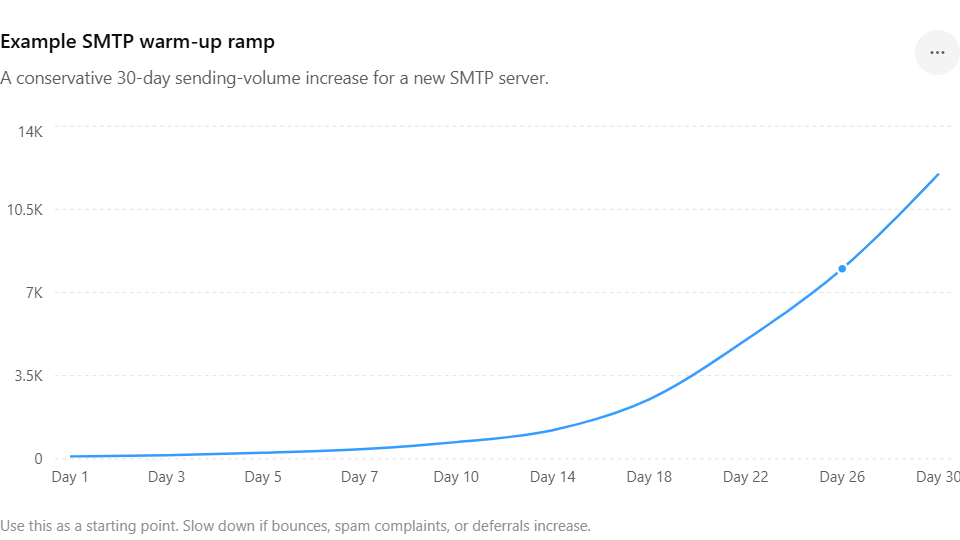
There is no single perfect warm-up schedule for every sender. Your ideal ramp depends on list quality, domain age, audience engagement, email type, and sending history. However, the chart below gives a safe starting point for a new SMTP server.
| Warm-Up Stage | Days | Suggested Daily Volume | Who to Send To | What to Watch |
|---|---|---|---|---|
| Stage 1: Reputation Start | Day 1–3 | 100–150 emails/day | Most active and recently engaged users | Bounces, spam complaints, delivery errors |
| Stage 2: Early Trust Building | Day 4–7 | 200–400 emails/day | Recent openers, clickers, customers, or subscribers | Inbox placement, engagement, soft bounces |
| Stage 3: Controlled Expansion | Day 8–14 | 500–1,200 emails/day | Engaged contacts from the last 30–90 days | Complaint rate, unsubscribe rate, deferrals |
| Stage 4: Volume Growth | Day 15–21 | 1,500–5,000 emails/day | Broader clean list segments | Provider-specific blocks or throttling |
| Stage 5: Production Ramp | Day 22–30 | 5,000–12,000 emails/day | Healthy list segments only | Reputation trends and campaign consistency |
| Stage 6: Scale Carefully | After Day 30 | Increase gradually based on performance | Only verified, opted-in, and cleaned contacts | Long-term deliverability and engagement |
Important: This is a sample ramp chart, not a fixed rule. If your bounce rate, complaint rate, or deferrals increase, pause volume growth and fix the issue before sending more.
Step-by-Step SMTP Warm-Up Process
Step 1: Start With Your Best Contacts
Your first warm-up emails should go to people most likely to recognize your brand and engage with your message. This may include recent buyers, active subscribers, account users, or customers who recently opened or clicked your emails.
Avoid old lists, purchased contacts, scraped emails, inactive users, and unverified addresses during warm-up. These contacts are more likely to bounce, ignore your email, unsubscribe, or report spam.
Step 2: Send Useful, Expected Emails
Do not start warm-up with aggressive promotions or cold pitches. Begin with emails that recipients expect and value, such as account updates, onboarding messages, product tips, customer notices, or helpful newsletters.
The goal is to create positive mailbox signals. Opens, clicks, replies, moving emails out of spam, and low complaint rates all help build trust.
Step 3: Keep Sending Consistent
Consistency matters. Sending 100 emails one day, 10,000 the next day, and nothing for a week can look unnatural. A better approach is to send daily or on a predictable schedule and increase volume gradually.
Step 4: Increase Volume Slowly
A safe SMTP warm-up usually starts with low volume and increases gradually. Many senders use small daily increases or stage-based increases every few days.
If the previous send performed well, increase the next send. If the previous send caused delivery issues, hold the volume steady or reduce it.
Step 5: Watch Provider-Level Performance
Do not only check total performance. Break results down by mailbox provider. Gmail, Yahoo, Outlook, corporate domains, and regional inbox providers may react differently.
For example, your emails may perform well overall but show deferrals at one provider. In that case, slow down sending to that provider while continuing carefully elsewhere.
Step 6: Remove Bad Addresses Immediately
During warm-up, list hygiene is critical. Remove hard bounces, repeated soft bounces, spam complainers, unsubscribed users, and inactive contacts from future sends.
Continuing to send to bad addresses tells mailbox providers that your list quality is poor.
Step 7: Pause When Warning Signs Appear
Warm-up is not only about increasing volume. It is about increasing volume only when your reputation signals support it.
Pause or slow down if you see:
- High bounce rates
- Spam complaints
- Sudden drop in opens or clicks
- Temporary blocks
- Mailbox provider deferrals
- Blacklist warnings
- Unusual unsubscribe spikes
SMTP Warm-Up Best Practices
Use a Dedicated IP for Higher Volume
A dedicated IP gives you more control over your sender reputation because your sending behavior is not mixed with other senders. This can be useful for businesses with consistent volume, serious email programs, or strict reputation requirements.
Separate Transactional and Marketing Emails
Transactional emails such as password resets, order confirmations, and account notifications are different from promotional campaigns. If possible, use separate subdomains or streams so one type of email does not damage the reputation of another.
Warm Up Your Domain Too
SMTP warm-up is not only about the server or IP address. Mailbox providers also evaluate domain reputation. If your sending domain or subdomain is new, treat it carefully and ramp volume gradually.
Do Not Use Purchased Lists
Purchased lists often contain invalid addresses, spam traps, and people who never asked to hear from you. They are dangerous during warm-up and can damage your reputation quickly.
Make Unsubscribing Easy
If people cannot unsubscribe easily, they may report your message as spam. A visible unsubscribe link protects your reputation and improves long-term deliverability.
Monitor Deliverability Every Day
Warm-up should be managed daily. Track performance, compare mailbox providers, review bounce logs, and adjust the ramp based on real results.
Common SMTP Warm-Up Mistakes
Sending Too Much Too Soon
This is the most common mistake. A new SMTP server needs time to build reputation. Sudden high-volume sending can trigger spam filters and throttling.
Using an Old or Unclean List
Old contacts may no longer recognize your brand. If many addresses bounce or complain, mailbox providers may reduce trust in your emails.
Ignoring Authentication
SPF, DKIM, DMARC, reverse DNS, and proper hostname configuration are not optional for serious email sending. Authentication problems can damage deliverability before warm-up even begins.
Changing Content Too Often
During warm-up, keep your email style consistent. Sudden changes in templates, links, From names, or sending patterns can make reputation signals harder to evaluate.
Not Reacting to Negative Signals
If complaints, bounces, or deferrals increase, do not continue the ramp blindly. Stop, diagnose, clean your list, and resume slowly.
How Long Does SMTP Warm-Up Take?
SMTP warm-up usually takes a few weeks, but the exact timeline depends on your sending goals and reputation signals. A small sender may complete a basic warm-up in 2–4 weeks. A high-volume sender may need a longer ramp, especially when using a new domain, new dedicated IP, or large subscriber list.
The safest rule is simple: do not scale based only on your desired volume. Scale based on deliverability performance.

When Should You Slow Down the Warm-Up?
Slow down your SMTP warm-up if you notice:
- Hard bounce rate increasing
- Spam complaints appearing
- Emails landing in spam more often
- Temporary blocks from Gmail, Yahoo, Outlook, or business domains
- Unusual delivery delays
- Low engagement from a new segment
- Blacklist or reputation warnings
Reducing volume is not a failure. It is a normal part of responsible warm-up. Fixing issues early is much easier than repairing a damaged sender reputation later.
Final SMTP Warm-Up Checklist
- SPF is configured correctly
- DKIM is active and passing
- DMARC is published and aligned
- PTR / reverse DNS is configured
- The sending domain is connected to a real website
- Unsubscribe links work properly
- The first audience segment is highly engaged
- Old, invalid, and inactive contacts are removed
- Daily sending volume follows a gradual ramp
- Bounces, complaints, and deferrals are monitored
- Volume increases only when performance is stable
Build Sender Reputation the Right Way
A new SMTP server can support reliable email sending, but only when it is warmed up carefully. SMTP warm-up helps mailbox providers understand your sending behavior, protects your reputation, and gives your campaigns a stronger chance of reaching the inbox.
If you are setting up a new sending system, start with a properly configured SMTP server, use clean lists, send expected emails, and increase volume step by step. For better long-term performance, combine warm-up with strong deliverability practices and a reputation strategy that matches your business goals.
FAQs About SMTP Warm-Up
What is SMTP warm-up?
SMTP warm-up is the process of gradually increasing email volume from a new SMTP server, domain, or IP address to build sender reputation with mailbox providers.
Why is SMTP warm-up important?
It helps mailbox providers learn that your emails are legitimate, wanted, and safe. Without warm-up, sudden high-volume sending may cause spam placement, throttling, or blocking.
How many emails should I send on the first day?
For a new setup, a conservative starting point is around 100 emails on day one, sent only to highly engaged contacts. Your actual number may vary based on your list quality and sending history.
Can I warm up an SMTP server with cold emails?
It is risky. Warm-up works best with permission-based, engaged recipients. Cold or unverified lists can produce low engagement, bounces, and spam complaints, which can damage reputation early.
How long does SMTP warm-up take?
Many senders need 2–4 weeks for an initial warm-up, while higher-volume senders may need more time. The right timeline depends on performance signals, not just a fixed calendar.
Do I need a dedicated IP for SMTP warm-up?
A dedicated IP is useful when you send consistent or high email volume and want more control over your sender reputation. If you use a new dedicated IP, warm-up is strongly recommended.